View all authors

Custom Functions in TypeScript

· 3 min read

The idea behind Juno's serverless functions is that you should be able to write them in either Rust or TypeScript following the same pattern and mental model. Parts of those, hooks, have been available in TypeScript for a while and are handy for reacting to events. But developers also often want to define their own functions, akin to adding custom endpoints to an HTTP API. That wasn't supported in TypeScript, until now 🚀.


Custom Functions

Custom functions let you define callable endpoints directly inside your Satellite, which can be explicitly invoked from your frontend or from other services.

There are two kinds.

A query is read-only. It returns data without touching any state, and it's fast. Use it when you just need to fetch something.

An update can read and write. Use it when your logic needs to persist data, trigger side effects, or when you need an absolute tamper-proof guarantee on the result.

import { defineQuery } from "@junobuild/functions";

export const ping = defineQuery({
handler: () => "pong"
});

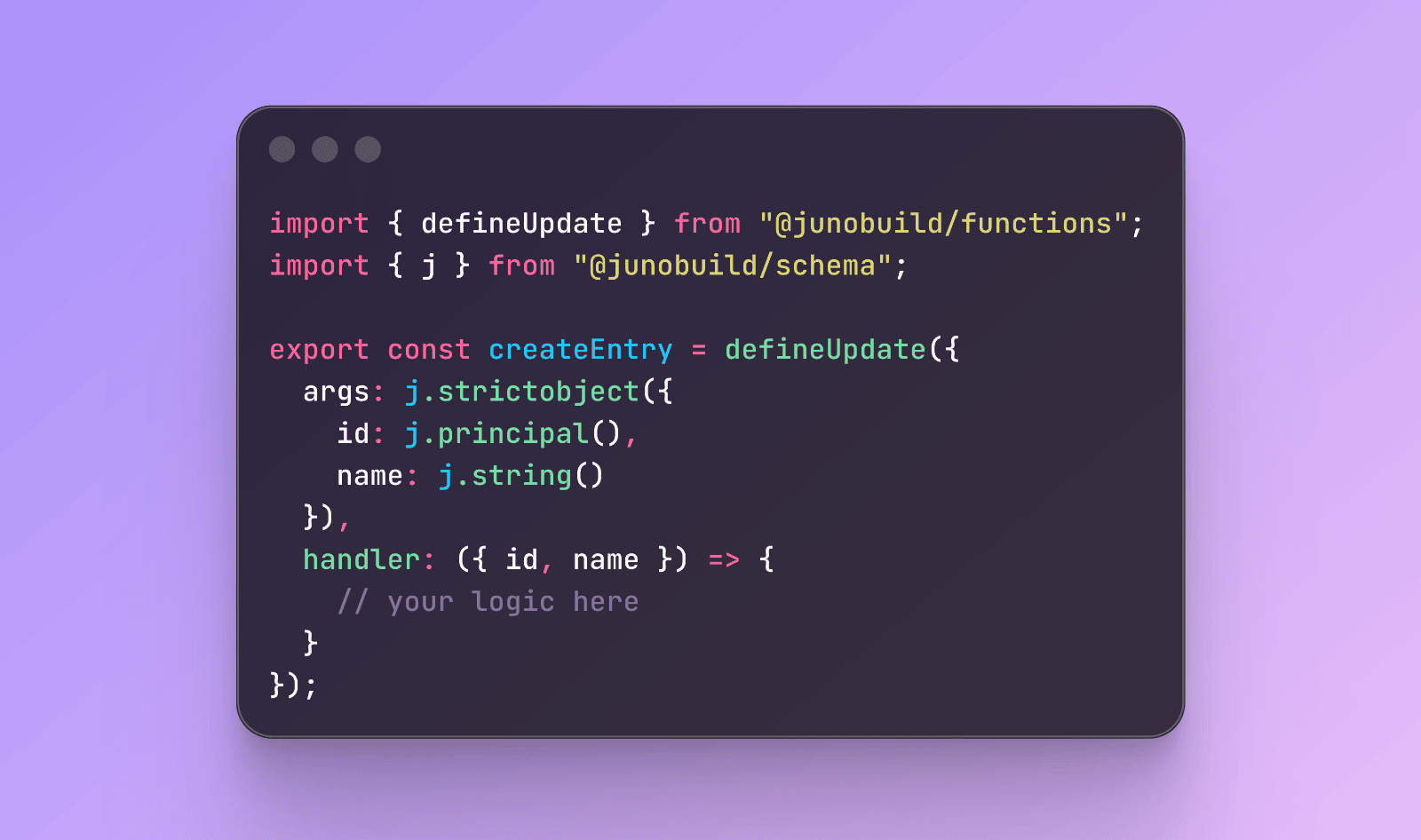
The functions can be described with optional arguments and results. They are strongly typed both at runtime and at build time thanks to a new type system, and their handlers can be synchronous or asynchronous.

import { defineUpdate } from "@junobuild/functions";
import { j } from "@junobuild/schema";

const ArgsSchema = j.strictObject({
name: j.string()
});

const ResultSchema = j.strictObject({
message: j.string()
});

export const myUpdate = defineUpdate({
args: ArgsSchema,
result: ResultSchema,
handler: async ({ name }) => {
// your logic here
return { message: `Saved ${name}.` };
}
});

Auto-generated Bindings

Another part that makes this genuinely fun to use: when you build your project, a type-safe client API is automatically generated based on your function definitions. No glue code, no manual wiring, no thinking about serialization. Your functions are simply available through the functions namespace.

import { functions } from "../declarations/satellite/satellite.api.ts";

await functions.ping();
await functions.myUpdate({ name: "David" });

Define the shape on the backend, call it from the frontend with full type safety. That's it.


Schema Types

Arguments and return types are optional, but when you need them, Juno provides a type system built on top of Zod to let you define their shapes.

import { j } from "@junobuild/schema";

Those schemas are validated at runtime and used at build time to generate all the necessary bindings. You define the shape once, you get safety everywhere.

const Schema = j.strictObject({
name: j.string(),
age: j.number()
});

Since you will likely need some environment-specific types, j extends Zod with j.principal() and j.uint8array().

const Schema = j.strictObject({
owner: j.principal(),
data: j.uint8array()
});

And when your function needs to handle multiple distinct input shapes, reach for discriminatedUnion:

import { defineUpdate } from "@junobuild/functions";
import { j } from "@junobuild/schema";

const Schema = j.discriminatedUnion("type", [
j.strictObject({ type: j.literal("cat"), indoor: j.boolean() }),
j.strictObject({ type: j.literal("dog"), breed: j.string() })
]);

export const registerPet = defineUpdate({
args: Schema,
handler: ({ args }) => {
if (args.type === "cat") {
// handle cat
} else {
// handle dog
}
}
});

Long story short, j is Zod with a few extras and everything you need to strongly type your functions.


References

Following sections of the documentation have been updated:


I'm genuinely excited about these improvements and can totally see myself not using Rust for writing serverless functions in most of my projects in a near future. Not entirely there yet, HTTPS outcalls support in TypeScript is still coming, but getting there.

To infinity and beyond
David

GitHub Automation and Authentication

· 4 min read

Like it or not, GitHub is where most developers already live - it's where code is written, reviewed, and shipped with or without AI. So rather than asking you to adapt your workflow to Juno, I've been working on bringing Juno closer to yours.

Two new features ship in that direction: a new recommended approach for automating deployments via GitHub Actions, and support for GitHub authentication in your applications 🚀.


Automation Without Secrets

Until now, setting up GitHub Actions to deploy your frontend or publish serverless functions required storing a JUNO_TOKEN in your GitHub secrets. It worked, but it came with the usual headaches, tokens to generate, rotate, and keep out of the wrong hands.

The new recommended approach uses OpenID Connect (OIDC). Instead of a static token, GitHub and your Satellite establish a trust relationship, and each workflow run gets short-lived credentials (access keys) automatically. Once the run is done, the credentials are gone.

No tokens to rotate. No secrets to manage. And if a workflow is ever compromised, there's nothing long-lived to steal.

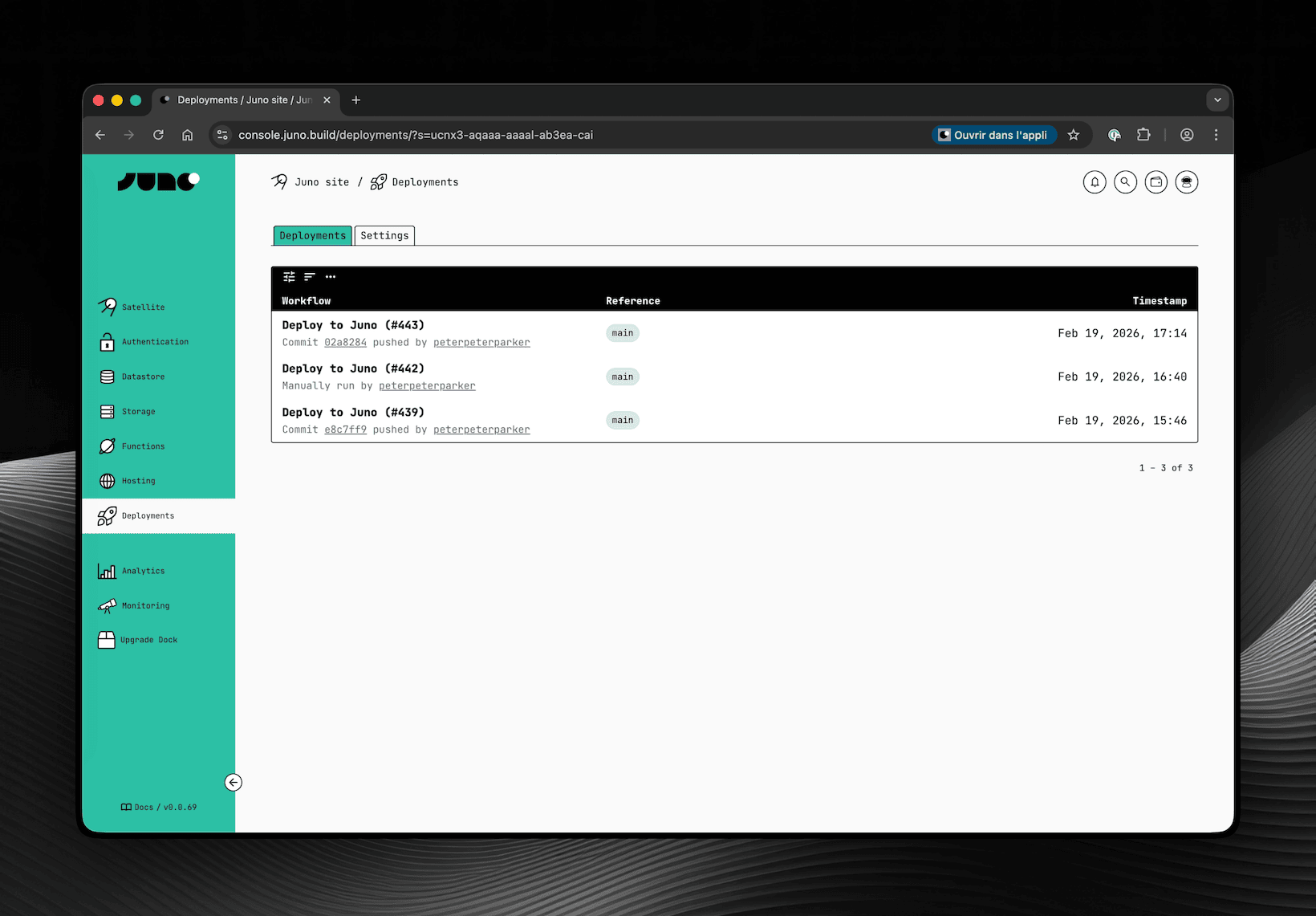
To support this, a new Deployments screen has been added to the Console. This is where you configure which repositories are allowed to deploy to your Satellite and where you can review past deployments.

tip

Obviously and as always, you can also configure the same options with your CLI if you prefer.

👉 Documentation

The new Deployments screen in the Juno Console, listing GitHub Actions workflow


GitHub Authentication

You can now add GitHub authentication to your application, letting your users sign in with their GitHub account, a natural fit for developer-facing apps.

Unlike other providers, GitHub does not natively support OpenID Connect. That's why this authentication requires a small proxy that handles the OAuth exchange securely to avoid exposing a client secret directly within your Satellite.

Juno provides an open-source API for this: github.com/junobuild/api. You self-host it, point your configuration to it, and from there the flow is straightforward, the user signs in, the proxy issues a JWT, your Satellite verifies it, and a session is created.

One thing to be aware of though: because the proxy signs JWTs with RSA keys, your Satellite needs access to those public keys to verify them. Rather than having each Satellite make HTTPS outcalls to your proxy on every request, Juno uses a shared infrastructure module called Observatory to fetch and cache those keys. Since you're self-hosting the proxy, you'll also need to deploy your own Observatory instance and configure it to point to your proxy's JWKS endpoint.

It's a bit tricky to set up but worth the effort if you're targeting developers. Reach out if you have questions, always happy to help!

👉 Documentation


One could argue that instead of improving the integration with GitHub, I should spin up custom infrastructure and provide the entire CI/CD for building and deploying. I wouldn't disagree. If the goal were to compete with cloud providers like AWS, Vercel, you name it, that would probably be the path. But devops is not really my thing, and that would be quite an effort both in terms of development and maintenance for the sole developer I am, who already takes care of a gigantic codebase 😅. Maybe someday, but honestly it feels unlikely as I doubt Juno will ever become a company.

Until then, I think this is a great step in the right direction - a tighter integration between Juno and the tools you already use day to day. Hope you find it useful too!

To infinity and beyond
David

Architecture Changes for a Better Developer Experience

· 4 min read

Happy New Year 🥳

We're kicking off 2026 with a major release that ships significant changes in the architecture and design of the Juno Console with a single goal: making the DX more straightforward and comprehensive.


Mission Control and Monitoring merged

Mission Control was originally designed as a dedicated control center for developers — a place to create and manage projects (Satellites) and analytics (Orbiters). Over time, it was also extended to include Monitoring.

The original idea was simple: the Console would only know a developer's identity and their Mission Control ID — nothing else.

While this approach had advantages, it also introduced significant drawbacks.

On every new sign-up, the Console had to automatically create a Mission Control. This meant that when a developer signed in and created their first (free) project, Juno had to provision two containers instead of one, increasing infrastructure costs.

It also led to a confusing user experience. Mission Control could not be hidden from the UI because modules must be provisioned with resources (cycles) to avoid being decommissioned. As a result, it was always visible, and many developers were unsure what Mission Control was or why it existed.

For these reasons, Mission Control and Monitoring have now been merged:

  • A Mission Control is created only when a developer explicitly enables Monitoring
  • Monitoring is now treated as a dedicated microservice

This architectural change brings clear benefits:

  • For developers: a clearer, more straightforward experience and simpler long-term maintenance
  • For Juno: acquisition costs for new developers are effectively cut in half

There are a few trade-offs to note:

  • The Juno Console now keeps track of all containers created by developers (Satellites, Orbiters, and Mission Controls), whereas previously it only knew the Mission Control ID.
  • When Monitoring is enabled, module metadata must be duplicated inside the Mission Control so it knows what to monitor. This introduces a risk of inconsistencies if a bug causes a mismatch between the Console and Monitoring data. To mitigate this, a Console feature is planned to compare and verify this information.

Deprecate ICP, use only Cycles

Over the past year, I've been refining both the platform and its communication to reinforce Juno's vision: a platform to build, deploy, and run applications in WASM containers, with ownership and zero DevOps.

As part of this effort, I've aimed to remove all blockchain and crypto-slangs.

While merging Mission Control and Monitoring, a new wallet ID - derived from the developer's sign-in - had to be introduced.

During this work, it became really clear again that the onboarding for new developers was just confusing:

Why do I need ICP to get cycles?

Since this release already introduced breaking changes, it felt like the right moment to simplify the model further.

As a result, ICP is now deprecated in favor of using cycles only.

This significantly simplifies the user journey:

  • You start using Juno for free
  • You learn about cycles as the resource that powers your containers and services
  • When you need more resources or want to spin up additional modules, you acquire cycles

To support this, the primary call to action for acquiring cycles now points to cycle.express, which allows developers to convert dollars directly into cycles. Third-party wallets like OISY remain supported, but are now positioned as secondary options for users already familiar with them.

Together with the other changes in this release, this should make both the developer experience and the mental model of how Juno works much more approachable.


Price increase

Previously, creating new Satellites or Orbiters cost 0.4 ICP. In practice, this was undervalued: each module is provisioned with 1.5 T cycles, while 0.4 ICP corresponds to roughly 0.93 T cycles—effectively a significant bonus.

Going forward:

  • Additional Satellites and Orbiters cost 3 T cycles (roughly $4).
  • Enabling Monitoring (which spins up a Mission Control) requires the same fee.
note

See the Pricing documentation for more details.


I believe these changes represent a significant step forward in making Juno more accessible and easier to understand. Whether you're just getting started or have been with us for a while, I hope these improvements make your development experience that much better.

To infinity and beyond
David

Juno is now fully open-source

· One min read

Hey 👋

Juno is now fully open-source. No more AGPL. The project is now entirely released under the MIT license.

While all the tools were already licensed under MIT, the platform itself, a few crates, and the documentation were still released under AGPL. That worked well in the early days but can create friction for those who want to reuse Juno, or parts of it, in commercial projects or corporate environments. Plus, AGPL is not that cool, no? 😎

You can also consider this a small Christmas gift 🎁😉

Thank you to everyone who followed, tested, used, and supported Juno this year. I wish you a Merry Christmas and a fantastic New Year 2026.

You can find the source code on GitHub: 👉 https://github.com/junobuild/juno

Merry Christmas from Zürich 🎄
David

Serverless Canister Calls in TypeScript

· One min read

Hey 👋

If you like working with ic-js in the frontend...
Say hello to serverless canister functions in TypeScript ⚡️

Write backend logic using the same TypeScript you already love — now with:

  • 💫 Built-in canister clients for the Internet Computer (ICP, ICRC, CMC, NNS, SNS...)
  • ⚙️ Full type-safety
  • 🔌 Zero agent setup
  • 🧠 Caller identity handled automatically
  • 🍱 ICP & ICRC transfers from serverless hooks

No Rust required. No backend headaches.


📚 Documentation

Want to go straight to the point? Checkout the 👉 references


Example

Transfer ICP directly from a Satellite serverless function:

import { IcpLedgerCanister } from "@junobuild/functions/canisters/ledger/icp";

export const onExecute = async () => {
const ledger = new IcpLedgerCanister();

const result = await ledger.transfer({
args: {
to: "destination-account-identifier",
amount: { e8s: 100_000_000n }, // 1 ICP
fee: { e8s: 10_000n },
memo: 0n
}
});
};

And yes - this works inside datastore hooks like onSetDoc and assertSetDoc, fully atomic.

Browse the full working example 👉 Making Canister Calls in TypeScript

Cool cool cool?

To infinity and beyond
David

Custom Domains Support Upgrade

· 2 min read

Hey 👋

A new release was shipped with two sweet improvements to the Console.

🌐 Custom Domains New API

The hosting features for registering or administrating custom domains have been migrated to the API from the DFINITY Boundary Nodes team.

This migration makes managing domains:

  • More reliable
  • Significantly faster
  • Future-proof

Massive kudos to the team delivering this capability - awesome work 💪

✨ UI Improvements

Alongside the domain upgrade, we shipped a few visual refinements:

Stronger contrast on cards and buttons for a cleaner, more readable interface (amazing what you can achieve by nudging brightness 😄)

The Launchpad has been slightly redesigned: "Create a new satellite" is now a primary button, bringing more clarity and guidance.

A screenshot of the launchpad that showcases the new contrast and actions that have been moved

Another screenshots from the authentication setup which displays the new tabs design

To infinity and beyond
David

Google Sign-In Comes to Juno

· 6 min read


TL;DR

You can now use your Google account to log into the Juno Console, and developers can add the same familiar login experience natively to the projects they are building.

Hey everyone 👋

Today marks quite a milestone and I'm excited to share that Google Sign-In is now live across the entire Juno ecosystem.

From my perspective, though time will tell, this update has the potential to be a real game changer. It brings what users expect: a familiar, secure, and frictionless authentication flow.

It might sound a bit ironic at first - we're integrating Google, after all - but I'm genuinely happy to ship this feature without compromising on the core values: providing developers secure features and modern tools with a state-of-the-art developer experience, while empowering them with full control over a cloud-native serverless infrastructure.

Let's see how it all comes together.


💡 Why It Matters

Authentication is one of those things every product needs but, it's complex, it touches security, and it's easy to get wrong.

Until now on Juno, developers could use Internet Identity, which has its strengths but also its weaknesses. It provides an unfamiliar login flow - is it an authentication provider or a password manager? - and it's not a well-known product outside of its niche.

Passkeys were also added recently, but you only have to scroll through tech Twitter to see that for every person who loves them, there's another who absolutely hates them.

That's why bringing native Google Sign-In to Juno matters. Developers can now offer their users a familiar, frictionless login flow - and let's be honest, most people are used to this signing and don't care much about doing it differently.

At the same time, this doesn't mean giving up control. The authentication process happens entirely within your Satellite, using the OpenID Connect standard.

You can obviously combine multiple sign-in methods in one project, offering your users the choice that best fits their needs.

When it comes to Juno itself, this also matters for two reasons: it potentially makes onboarding - through the Console - more accessible for web developers who don't care about decentralization but do care about owning their infrastructure ("self-hosting"). And it opens the door to future integrations with other providers. I still hope one day to have a better GitHub integration, and this might be a step toward it.

Long story short, it might look like a trivial change - just a couple of functions and a bit of configuration - but it's another step toward Juno's long-term goal of making it possible to build and scale modern cloud products without compromising on what matters most: empowering developers and their users.


⚙️ How It Works

When a user signs in with Google, Juno follows the OpenID Connect (OIDC) standard to keep everything secure and verifiable.

  1. The user signs in with Google.
  2. Google verifies their credentials and issues a signed OpenID Connect token.
  3. After redirecting to your app, that signed token (JWT) is sent to your Satellite.
  4. Inside the container, the token and its signature are verified, and the user's information (such as email or profile) is extracted.
  5. The Satellite then creates a secure session for the user.
  6. Once authenticated, the user can start interacting with your app built on top of your container's features.

🧩 Infrastructure

At this point, you get the idea: aside from using Google as a third-party provider, there's no hidden “big tech” backend behind this. Everything else happens within your Satellite.

The credentials you configure - your Google project and OAuth 2.0 Client ID - are yours. In comparison, those used in Internet Identity are owned by the DFINITY Foundation. So, this approach might feel less empowering for end users or more empowering for developers. You can see the glass half full or half empty here.

To validate tokens on the backend, your container needs access to the public keys Google uses to sign them. Since those keys rotate frequently, fetching them directly would introduce extra cost and resource overhead.

That's why the Observatory - a shared module owned by Juno (well, by me) - comes in. It caches and provides Google's public keys, keeping verification fast, efficient, and cost-effective.

Because Juno is modular, developers who want full control or higher redundancy can run their own Observatory instance. Reach out if you're interested.


🪄 Setup Overview

Getting started only takes a short configuration. Once your Google project is set up, add your Client ID to your juno.config file:

import { defineConfig } from "@junobuild/config";

export default defineConfig({
satellite: {
ids: {
development: "<DEV_SATELLITE_ID>",
production: "<PROD_SATELLITE_ID>"
},
source: "dist",
authentication: {
google: {
clientId: "1234567890-abcde12345fghijklmno.apps.googleusercontent.com"
}
}
}
});

Then apply it using the CLI or manually through the Console UI. That's it, it's configured.


🧑‍💻 Usage

To add the sign-in to your app, it only takes a single function call - typically tied to a button like "Continue with Google".

import { signIn } from "@junobuild/core";

await signIn({ google: {} });

For now, it uses the standard redirect flow, meaning users are sent to Google and then redirected back to your app.

You'll just need to handle that callback on the redirect route with:

import { handleRedirectCallback } from "@junobuild/core";

await handleRedirectCallback();

I'll soon unleash support for FedCM (Federated Credential Management) as well.

Aside from that, nothing new - the rest works exactly the same.

Regardless of which authentication provider you're using, you can still track a user's authentication state through a simple callback:

import { onAuthStateChange } from "@junobuild/core";

onAuthStateChange((user: User | null) => {
console.log("User:", user);
});

And because type safety is the way, you can now safely access provider-specific data without writing endless if statements:

import { isWebAuthnUser, isGoogleUser } from "@junobuild/core";

if (isWebAuthnUser(user)) {
console.log(user.data.providerData.aaguid); // Safely typed ✅
}

if (isGoogleUser(user)) {
console.log(user.data.providerData.email); // Safely typed ✅
}

🛠️ Managing Users

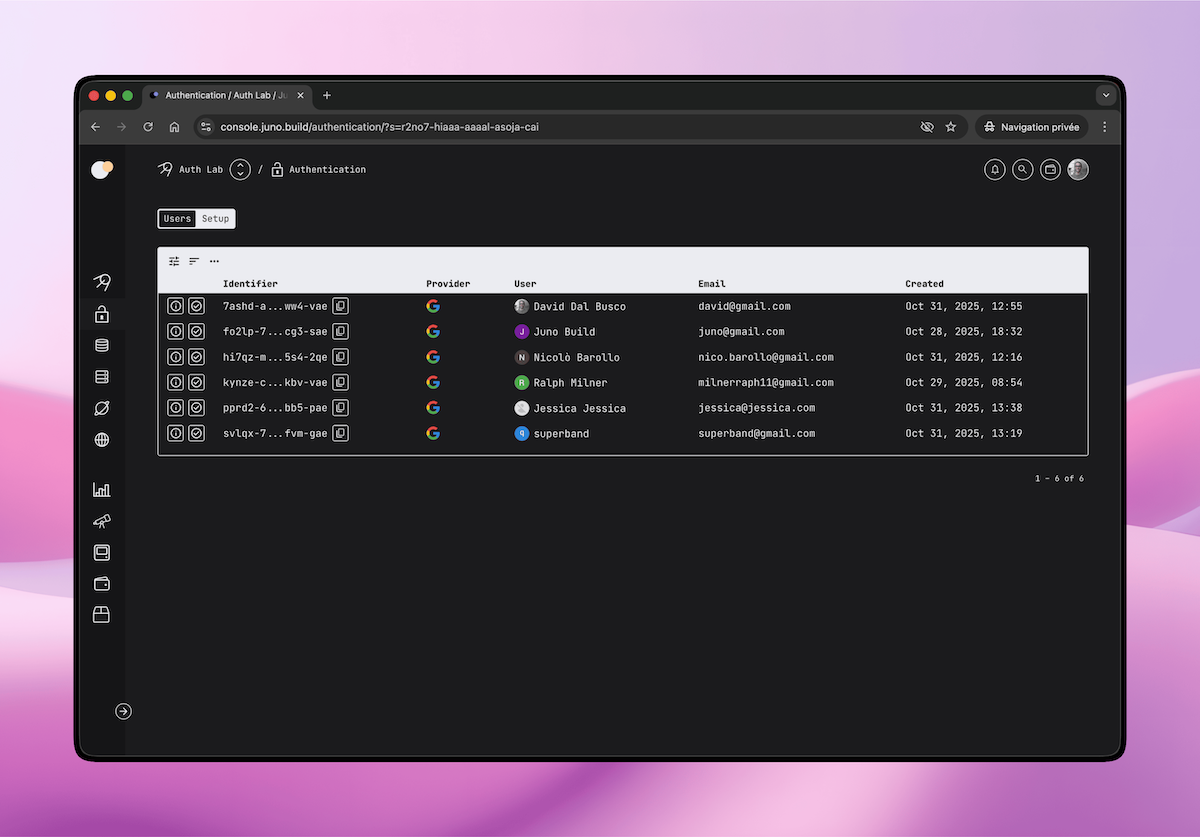
Once users start signing in, you can view and manage them directly in the Authentication section of the Console.

Each user entry displays key details such as:

  • Name and email address
  • Authentication provider
  • Profile picture (if available)

This view also lets you filter, sort, refresh or ban users etc.

Screenshot of the Juno Console showing users authenticated with Google


📚 Learn More

You can find all the details - including setup, configuration, and advanced options - in the documentation:

If you haven't tried Juno yet, head over to console.juno.build and sign in with Google to get started.

Ultimately, I can tell you stories, but nothing beats trying it yourself.

To infinity and beyond,
David


Reach out on Discord or OpenChat for any questions.

Stay connected with Juno on X/Twitter.

⭐️⭐️⭐️ stars are also much appreciated: visit the GitHub repo and show your support!

New (kind of) breadcrumbs nav, who dis?

· 2 min read

A screenshot of the new Console UI with navigation on the Datastore page

I tagged a new release as I deployed a new version of the Console UI to mainnet.

Aside from the updated navigation, which now displays the page title within breadcrumb-style navigation, and a few minor fixes, not much has changed feature-wise.

The biggest change in the frontend's codebase, which explains why so many files were touched, is a refactor to adopt the new pattern I’ve been using for DID declarations.

Instead of relying on auto-imported separate types, I now prefer grouping factories in a single module, exporting them from there, and importing the types through a suffixed module DID alias.

You can check out the pattern in Juno's frontend codebase or in the ic-client JS library. If you're curious about it, let me know.

It’s a small structural shift that makes the code much cleaner and more readable.

Finally, there are a few new E2E tests added in this repo and in the CLI.

To infinity and beyond 🍞✨
David

Offline Snapshots with the CLI

· One min read

Hi 👋

Here is a small but handy update for your toolbox: you can now download and upload snapshots offline with the Juno CLI. 🧰

That means you can:

  • Keep a local copy of your module’s state
  • Stash it somewhere safe, just in case 😅
  • Restore it when needed
  • Or even move it between Satellites
juno snapshot download --target satellite
juno snapshot upload --target satellite --dir .snapshots/0x00000060101

Build & Run Scripts with “juno run”

· 2 min read

Say hello to juno run 👋

Build custom scripts that already know your env, profile & config.
Write them in JS/TS.
Run with the CLI. ⚡️

🍒 on top? Works out of the box in GitHub Actions!

For example:

import { defineRun } from "@junobuild/config";

export const onRun = defineRun(({ mode, profile }) => ({
run: async ({ satelliteId, identity }) => {
console.log("Running task with:", {
mode,
profile,
satelliteId: satelliteId.toText(),
whoami: identity.getPrincipal().toText()
});
}
}));

Run it with:

juno run --src ./my-task.ts

Now, let’s suppose you want to fetch a document from your Satellite’s Datastore (“from your canister’s little DB”) and export it to a file:

import { getDoc } from "@junobuild/core";
import { defineRun } from "@junobuild/config";
import { jsonReplacer } from "@dfinity/utils";
import { writeFile } from "node:fs/promises";

export const onRun = defineRun(({ mode }) => ({
run: async (context) => {
const key = mode === "staging" ? "123" : "456";

const doc = await getDoc({
collection: "demo",
key,
satellite: context
});

await writeFile("./mydoc.json", JSON.stringify(doc, jsonReplacer, 2));
}
}));

Fancy ✨

And since it’s TS/JS, you can obviously use any libraries to perform admin tasks as well.

import { defineRun } from "@junobuild/config";
import { IcrcLedgerCanister } from "@dfinity/ledger-icrc";
import { createAgent } from "@dfinity/utils";

export const onRun = defineRun(({ mode }) => ({
run: async ({ identity, container: host }) => {
if (mode !== "development") {
throw new Error("Only for fun!");
}

const agent = await createAgent({
identity,
host
});

const { metadata } = IcrcLedgerCanister.create({
agent,
canisterId: MY_LEDGER_CANISTER_ID
});

const data = await metadata({});

console.log(data);
}
}));

Coolio?

I’ll demo it next Monday in Juno Live. 🎥 https://youtube.com/@junobuild

Happy week-end ☀️